
Snooze
Snooze an alert to be reminded again later — closer to when your event actually starts.
Snooze Options
When an alert appears, the Remind Me row gives you three ways to snooze:
| Button | What it does |
|---|---|
| In [time] | Dismiss the alert and re-show it after a short interval |
| [N] min before | Dismiss and re-show at your configured lead time before the event |
| at event start | Dismiss and re-show exactly when the event begins |

Each button shows its keyboard shortcut, so you can snooze without reaching for the mouse. See Keyboard Shortcuts.
In [time]
Snoozes for a short, fixed interval. The button and its dropdown adapt to how far away the event is — when the event is more than an hour out you’ll see longer options (like 30, 45, or 60 minutes), and as it gets closer the choices shrink all the way down to 1, 3, or 5 minutes. Click the main button for the shortest option, or open the dropdown to pick from the other two.
[N] min before
Re-shows the alert at N minutes before the event starts. The main button uses your configured Default snooze time (see below); the dropdown offers other lead times that still fit before the event begins. This button is disabled when there’s no time left for it to be useful — when the snooze would otherwise fire after the event has already started.
at event start
Re-shows the alert exactly when the event begins. This button becomes disabled once the event has started.
Configuring “Default Snooze Time”
The N in the “[N] min before” button is configurable. Go to Settings → Alerts and adjust the “Default snooze time” field.
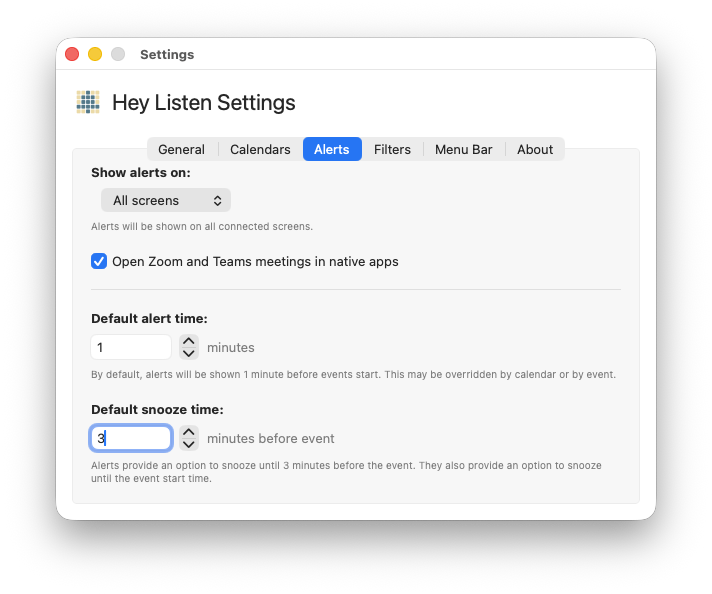
For example, if you set this to 2 minutes, the button will read “2 min before”, and snoozing will re-show the alert 2 minutes before the event starts — giving you one final heads-up right before go time.
How Snooze Works
When you snooze, Hey Listen schedules the alert to re-fire at the calculated time. If that time passes while your Mac is asleep, the alert fires as soon as you wake up — as long as the event hasn’t ended yet.
Each snooze is tracked per event, so snoozed alerts don’t interfere with alerts for other events happening around the same time.